
Pilot Training Tracker
Flight School Management Software
Schedule lessons, track student progress, and keep flight records in one place. More time teaching. Less time chasing paperwork.
For flight schools. No credit card required.
Product screens
From the next lesson to checkride day
Plan a lesson, record the flight, and review student progress. Product screenshots show example records, not live school activity.
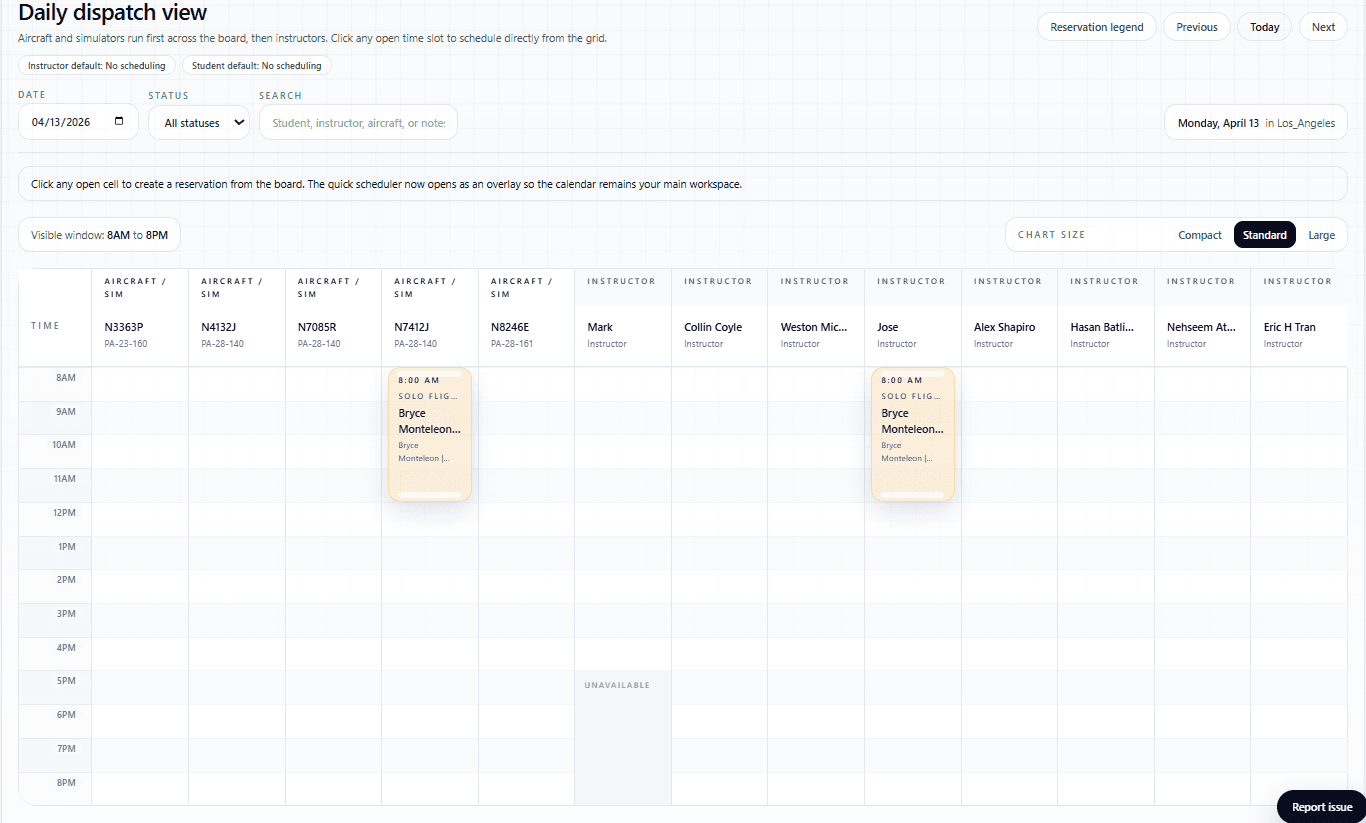
1. Plan the next lesson
Find an available aircraft and instructor, reserve the lesson, and keep everyone on the same schedule.
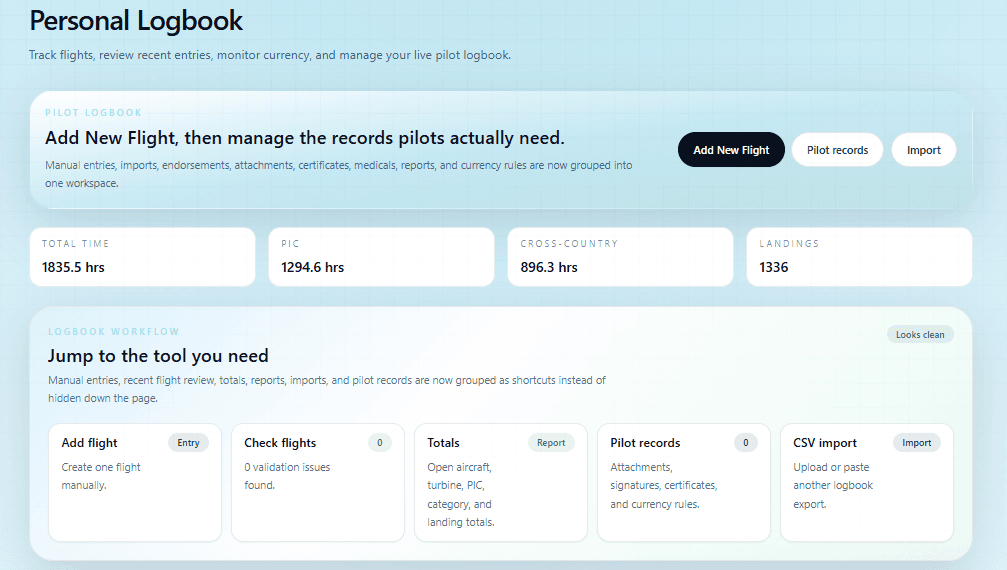
2. Record the flight
Add flight time, review totals, and connect your MyFlightbook account to keep flight records together.
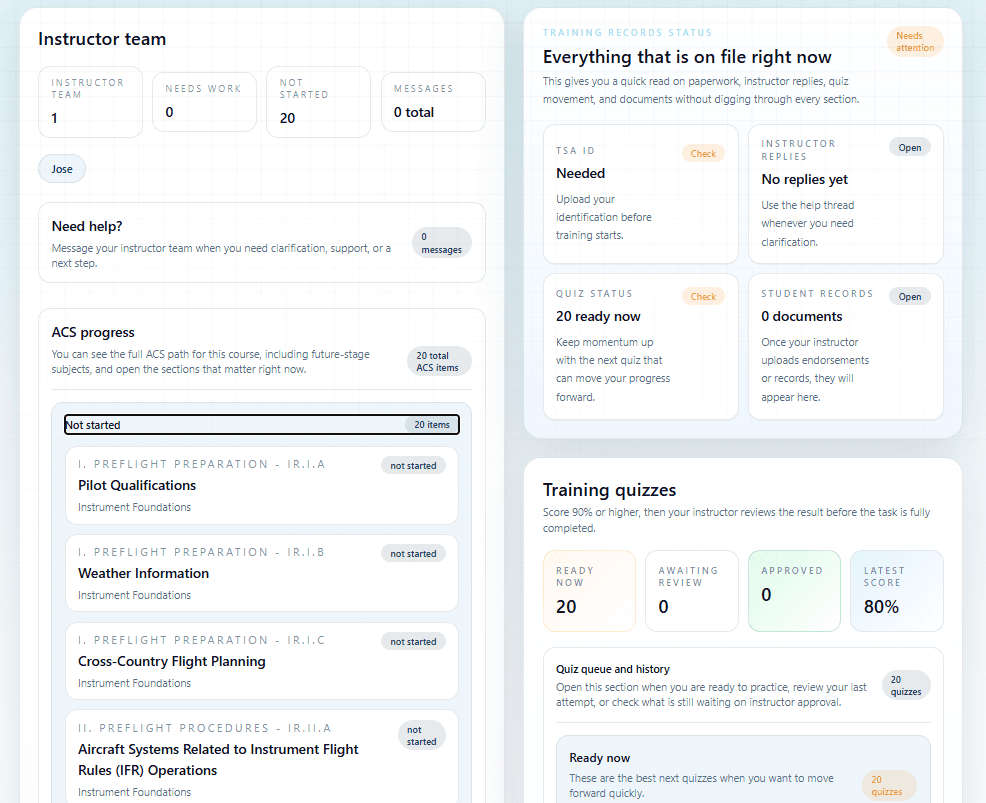
3. Know what to practice next
Instructors record ACS progress. Students see completed tasks and the training still needed before their checkride.
Choose your path
One school. A workspace for everyone.
Plan the day, teach the lesson, and follow student progress with dashboards for each member of your team.
Flight schools
Manage the schedule, student progress, aircraft, and staff from one school account.
Instructors
Prepare for lessons, record student progress, manage endorsements, and keep your flight records and timesheets up to date.
Students
See what is complete, what still needs work, what is scheduled next, and what unlocks the next stage of training.
Feature highlights
Keep the daily details under control.
Manage lessons, aircraft, staff hours, and student records without losing track of the next task.
Scheduling and dispatch board
Aircraft and instructor schedule board, drag-and-drop reservations, dispatch states, check-out and check-in, waitlist alerts, reminders, and Apple or Google calendar sync.
ACS, stage gates, and readiness
Track ACS items, pre-solo requirements, aeronautical experience, stage progression, endorsements, and what still blocks a student from moving forward.
Quizzes and study workflow
One quiz per ACS item, randomized answer order, instant student grading, instructor review, and AI-supported coaching tied to FAA references.
Records, files, and reports
Student files, TSA documents, branded parent progress reports, endorsements, school reports, and cleaner records for audits and checkride prep.
Logbook and flight follow-up
Add flights, import records, review totals, and connect your MyFlightbook account to sync flight records.
Messaging and notifications
Keep training conversations together with a shared inbox and email or SMS reminders through enabled channels.
Maintenance reminders
Track Tach or Hobbs-based maintenance intervals and see which aircraft are approaching a service deadline.
Timesheets and payroll flow
Review instructor work hours, sick pay, time-off requests, attendance records, and payroll exports.
Connected training
Keep your team working from the same record.
Students can see what is complete, what is not completed yet, what is scheduled next, and what still needs instructor action.
Instructors can move straight from a flight reservation into grading, notes, endorsements, files, and logbook follow-up.
School administrators can review training progress, schedules, maintenance reminders, timesheets, messages, and reports in one place.
One home for the whole training operation
Admins, instructors, students, and school staff all work from the same live record instead of fragmented notes and spreadsheets.
Built around real instructor judgment
The workflow is centered on stage progression, endorsements, dispatch, check-in follow-up, and readiness, not generic classroom software patterns.
Strong enough for daily operations
Scheduling, maintenance alerts, messages, reports, and timesheets stay alongside student progress.
Pricing
Choose the plan that fits your team.
Flight School
Up to 10 instructors included, plus unlimited students and aircraft.
Independent Instructor
Standalone instructor account with unlimited students.
Explore every feature
See how scheduling, dispatch, ACS tracking, endorsements, messaging, reports, and logbooks fit together.
Flight school scheduling software
Plan lessons, manage aircraft availability, and keep instructors and students informed.
Independent instructor software
Manage your own students, lessons, endorsements, and records.
Find a DPE near you
Search weekly imported FAA examiner records by location, checkride, aircraft category, and distance.
Questions schools ask
Questions before you get started
What is Pilot Training Tracker used for?
It gives flight schools, instructors, and students one shared portal for scheduling, dispatch, ACS progress, stage gates, quizzes, messaging, records, endorsements, reports, and logbook workflow.
Can schools manage both training and operations in one place?
Yes. The platform covers training records, schedules, reminders, maintenance alerts, timesheets, school settings, messages, and branded progress reporting.
Can instructors keep up with student readiness more easily?
Yes. Instructors can grade ACS tasks, manage endorsements and student files, review quizzes, sync reservations into follow-up workflow, and see daily priorities from one dashboard.
Can students clearly see progress and upcoming lessons?
Yes. Students can see completed tasks, not-yet-complete items, next reservations, unread messages, aeronautical experience requirements, and their current training status.
Your next step
Try it with your flight school.
Invite your team, add your aircraft, and plan your first lesson. Your 30-day school trial does not require a credit card.